



Touch typing is one of the most important and useful skills blind and visually impaired children can learn. That's because it facilitates written production by eliminating the need to look at the keyboard.
When the typewriter and touch typing method were first introduced in the late 1800s, it was clear the technology would be of great importance. Schools provided instruction so individuals could learn to type, and eventually the commercial typewriter became more widely used than the Braille Writer. It enabled visually impaired children to write but also opened up new career opportunities as blind people began working as typists and transcribers.
The great thing about typing is it puts blind students on equal footing with their sighted peers, as the skill is primarily one of muscle memory. It also removes any roadblocks that children who struggle with visual impairments and even learning difficulties, such as dyslexia, dysgraphia and dyspraxia, may experience trying to write by hand.
When an individual who has learned touch typing sits down at a computer, ideas flow freely through the fingertips and onto the screen, regardless of whether or not they can see the text that is produced. This is because the typist can carry on recording thoughts without getting caught up in the mechanics of forming letters.
Plus, the more one types, the more automatized the process becomes and the more spelling skills are strengthened.
New technology
Thanks to today’s technology, being blind or visually impaired no longer comes with restrictions on independence. Individuals who have impaired sight can live on their own, receive a quality education and pursue their chosen career path, all with the help of computers.
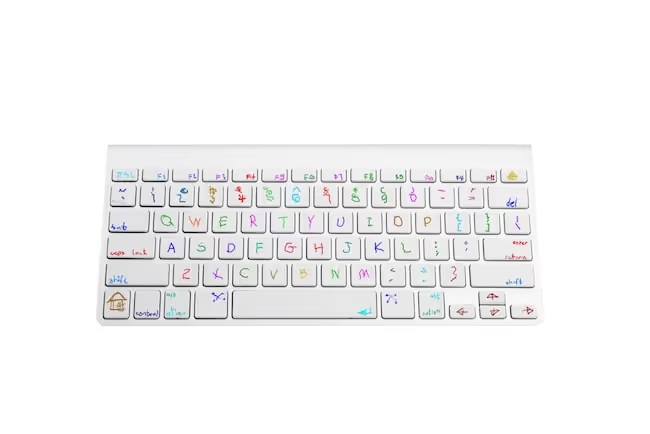
Technology gives us access to countless tools, such as screen readers, recording devices, text to speech readers and electronic whiteboards with high contrast displays. Keyboards help us use word processors and make the Internet easier to navigate.
For those students who have some sight (not all individuals with visual impairments are completely blind), technology can support them in developing and using their potential sight to the fullest. Often this is achieved through the use of specific applications. For example, using a keyboard and a special screen reader together can help a student learn to see the computer and become more comfortable relying on touch and sound combined with sight to navigate it.

What about Braille?
Braille is still taught to visually impaired children, yet depending on their sight abilities, they may choose to rely on traditional text read out by a computer and/or with the font increased to a mega-size.
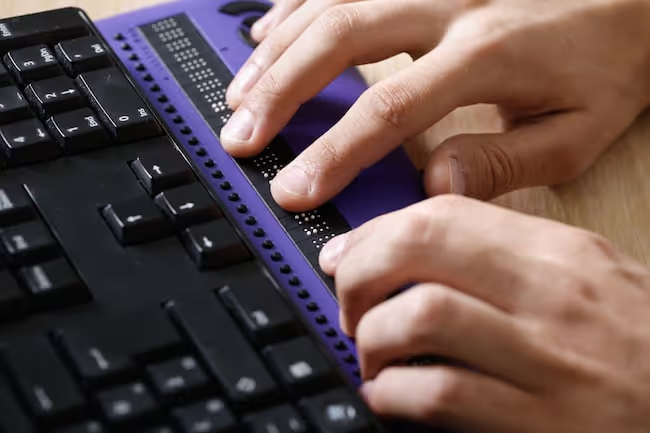
That’s because text, particularly electronic text, has become dominant in today’s digitized world (although researchers are developing new technology so Braille can be typed, even on touch screens).
While Braille is still a significant option, it is not always a practical choice for the blind or visually impaired student to rely on when reading or writing longer compositions.
It’s also less used for writing because individuals who don’t have visual impairments can’t read it. Lastly, Braille can be expensive to produce, leading to reduced availability in reading options.
In fact, the cheapest way to produce Braille is to type a document and run it through a Braille encoder on your personal computer. It can then be rendered via new printing technology.
Visual impairment in the classroom
Reading materials for the visually impaired were historically quite difficult for teachers to obtain. Early readers are often full of large printed text on high contrast backgrounds, but as children progress in ability, the amount of text per page grows, as font-size shrinks.
Technology has changed everything in this regard, making it possible for visually impaired children to learn alongside their peers with the help of computers that can read documents aloud and even special cameras that magnify whiteboard text on their screen during classroom lessons.
But touch typing is still a crucial skill. And the earlier children learn touch typing, the better. That’s because typing will help them develop strong literacy skills when completing written assignments by hand is either not an option or takes too much time.
Navigating computers through typing also opens up a world of reading resources, with many popular books available as audio files that can be listened to or text files that can be converted by new software.
Learning to type
Both sighted and blind people learn touch typing in the same way, by training their fingers to type keys and spelling words out using muscle memory vs. visual cues. Here are some tips that can make touch typing easier, especially for blind and visually impaired students.
- Take it one step at a time. When you learn to type it is important to focus only on the letters introduced in an individual lesson. Jumping ahead can cause mistakes and incomplete learning of certain letters. Master one set of keys at a time to ensure you have a solid foundation for when you begin typing full sentences.
- Create tactile guides. For help in finding the home row keys and achieving correct finger placement, use the raised lines on the “F” and “J” keys. They will ensure you can always orient yourself to the rest of the keyboard. If you struggle with certain letters, have a teacher or friend place a drop of clear glue or apply blue tack to a particularly troublesome key, to remind you of its letter.
- Use a multi-sensory approach. Your hands will begin to create a touch-based map of the keyboard as you move through a typing course. However, it’s essential to choose a course that provides a multi-sensory approach with accompanying audio and visual prompts, especially for those students who have some sight.
- Try a typing lesson. It’s certainly possible to learn touch typing on your own, but having a teacher or tutor there to guide you can be a big help in the beginning. Everyone learns at his or her own pace, but given your enhanced reliance on sense of touch, you may even learn typing faster than your sighted peers!
- Take advantage of new technology. Not all applications have settings that make them user-friendly for the visually impaired, so be sure to look for a programme that helps you take full advantage of new technology. For example, some websites have an “Accessibility” tab which allows you to turn on audio narration, adjust print size and select your preferred text and background color.
- Keep at it. Learning to touch type is a life skill that’s well worth pursuing, especially given the number of benefits and new career paths it opens up for the person with a visual impairment. If you are struggling to master typing on your own, consider giving the TTRS course a try. Its modular design provides guidance, feedback and praise at every step along the way, to keep you motivated to learn touch typing at a pace that is just right for you.
Teaching typing
Receiving special attention and help to overcome visual impairments can negatively affect a student’s attitude toward school, particularly when it comes to activities that rely heavily on visual cues, such as reading and writing.
Yet a child can boost self-esteem and develop more self-confidence in literacy skills through successful completion of a touch typing course in which he or she may even learn at a faster rate than sighted peers. For inspiration, have a look at this report from Greenwich Education on using TTRS with visually impaired children.
If you are an adult with a visual impairment keep in mind that it’s never too late to learn to touch type.